Click any of the images below to view a larger version.
Log In to Website Backend
Go to https://florencewineandfood.com/login and enter your login information.
If you do not remember your login info, please use the lost your password link below the login box.

Editing a Sponsor with a Logo
From the dashboard menu on the lefthand side, click Partners. Search for / select the sponsor you would like to edit.
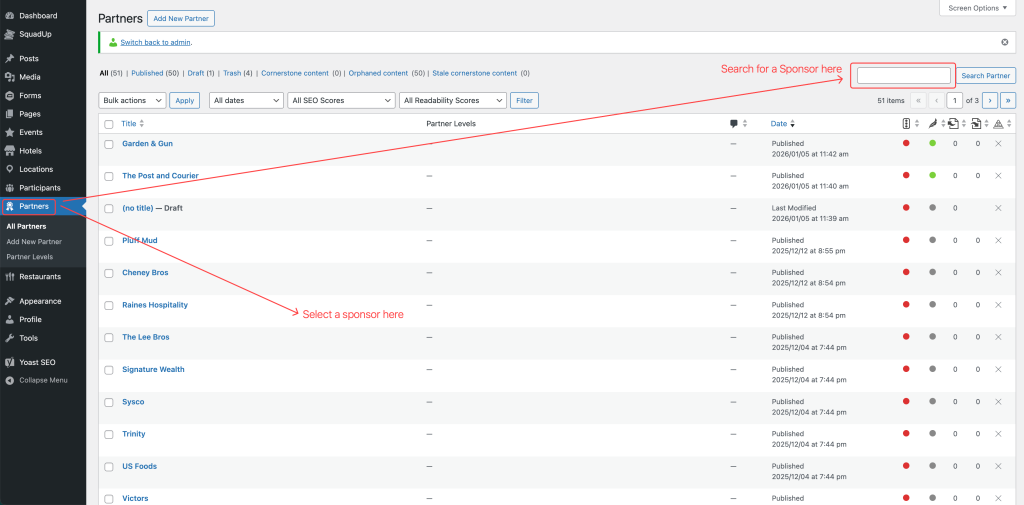
Edit any of the following data (see corresponding screenshots below):
- Title: this won’t be displayed on the front end; it is only for identification purposes in the backend
- Website: This is the click-through link for the Sponsors / Events pages. Please make sure to copy and paste the full URL, including the http:// or https://
- Featured Image (logo): Click the current logo to select/upload a new logo. The logo should be sized to 4oo x 270 pixels before uploading. Mobius is happy to help with logo sizing, if needed.
Click the blue “Update” button once you are done adding all data.


